Android tool for field sales and inventory control
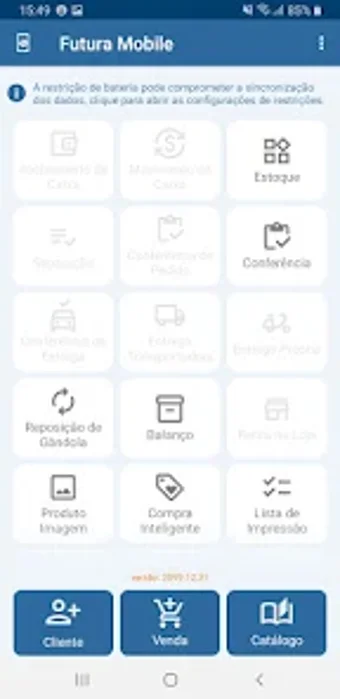
Futura Mobile, from Futura Sistemas Automação Comercial, is an Android business app that extends a central ERP to mobile devices for field commercial operations. The app lets sales teams create and manage orders, prepare service budgets, and register customers while consulting product information and stock on the go. Key functions include real-time product lookup, inventory monitoring, and backend synchronization. It targets sales representatives and managers who need mobile access to company ERP workflows.
What does the app do in the field?
This mobile client serves as a mobile extension of the central enterprise system, connecting to the Futura Server backend to mirror commercial data. Field users can create and manage sales orders, prepare service budgets, and register customers while checking product details and stock levels. That connection preserves record consistency between device entries and office databases so field actions are visible to back-office processes once synced.
How does it affect device performance and offline work?
Designed for Android phones and tablets, the interface emphasizes quick data entry during visits. It permits offline data capture so entries and orders are typically transmitted to the server when a network is available. Because operation depends on that backend link and on-device entry, administrators should plan synchronization windows and verify network reliability in areas where field staff operate to avoid delays.
Is it safe for handling commercial data?
Native integration with the server is intended to preserve data integrity across office and field systems, reducing the chance of conflicting records. Operation requires a valid server-side configuration, which places responsibility for access control and safeguards on the central setup. Administrators must maintain account permissions and server protections, since the mobile client acts under the server's security model rather than replacing it.
Do I need technical knowledge to operate it?
Field staff can perform routine commercial tasks without deep technical training because the interface focuses on rapid entry and product lookup. IT or system administrators should handle installation and the server linking step, since a configured backend is necessary for normal operation. Short training on profile management and synchronization practices helps teams avoid data conflicts during day-to-day use.
Who benefits and how to deploy it successfully
This tool is a practical option for sales representatives and managers operating inside the developer's ERP ecosystem, provided technical staff manage the deployment. A trade-off exists: rollout requires coordination with IT for configuration and validation. Practical tip, run a staged pilot with a small sales group to confirm workflows and training needs before broader rollout. The tool is dependable for organizations committed to the platform.
Pros
Native integration preserves data integrity with the server
Offline data capture with later synchronization
Interface tailored for fast on-site data entry
Supports full customer registration and product searches
Cons
Requires an active Futura Server installation and configuration
Dependence on network availability for timely synchronization
Laws concerning the use of this software vary from country to country. We do not encourage or condone the use of this program if it is in violation of these laws. Softonic may receive a referral fee if you click or buy any of the products featured here.